Contents
01My contribution
My contribution
What I did
- Designed and built the prototypes in lo-, mid- and hi-fi.
- Introduced reachability mode and the Quick Actions shortcut.
- Applied the research and accessibility findings to the screens.
With the team
- Research, usability tests and weekly meetings with Mobill were shared in Case group 5.
- Some changes, like the clickable price area, came out of team discussions.
02The problem
A small doubt can mean a real fine
Public reviews described fines after choosing the wrong zone, or after the app seemed to show active parking when it wasn’t. Time pressure, glare and one-handed use make this harder for everyone.
Design question
How might we help first-time users start parking confidently, understand the cost, and know their parking is really active?
03Key insights
Three moments that needed to be clearer
Unclear activation
In our review, the confirmation could read as “done” before parking was actually verified.
Price came too late
Our heuristic review found that total cost and fees weren’t clear before committing.
People park first
Field observations showed people open the app after parking — often in a hurry.
04Design solution
A clearer way to check parking status
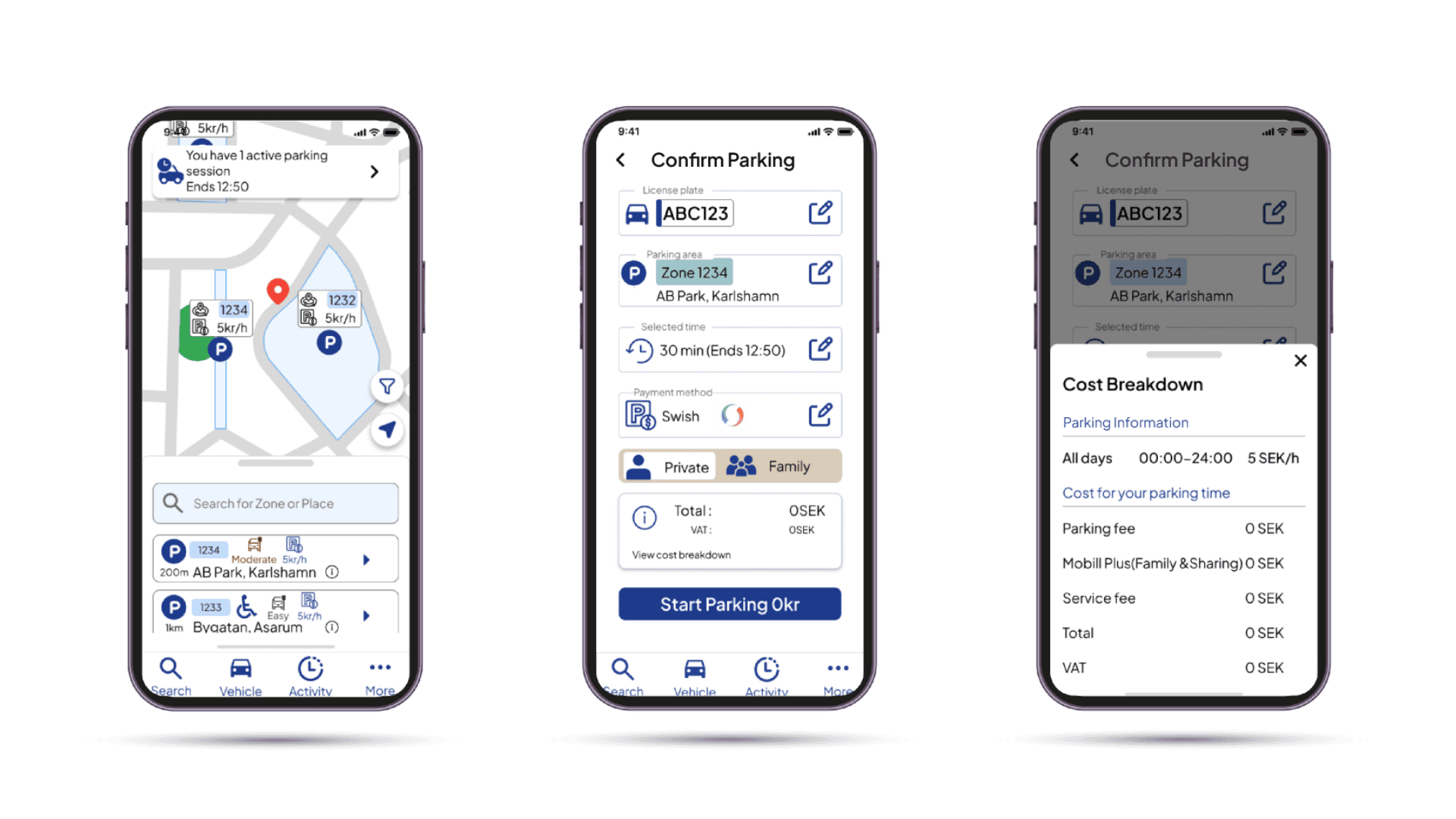
All screens are from my own high-fidelity prototype.
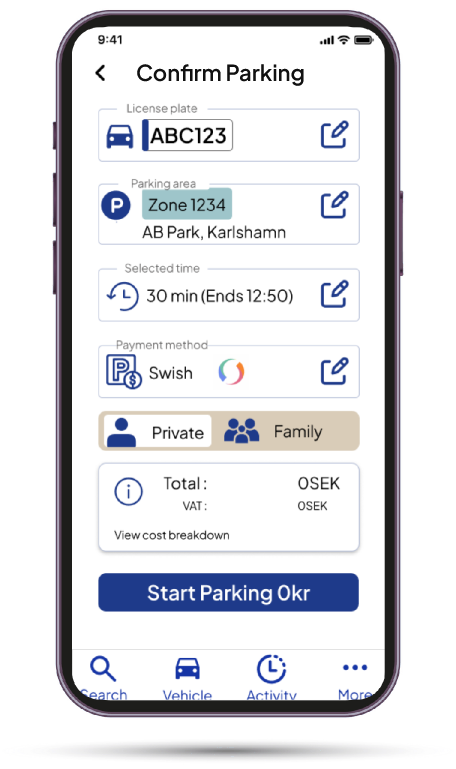
One review before committing
- Problem & evidence
- Users weren’t sure what they were agreeing to.
- My design decision
- Zone, time, vehicle and payment on one page, with the total right above “Start parking”. A longer wizard wasn’t needed — the commitment point just had to be clear.
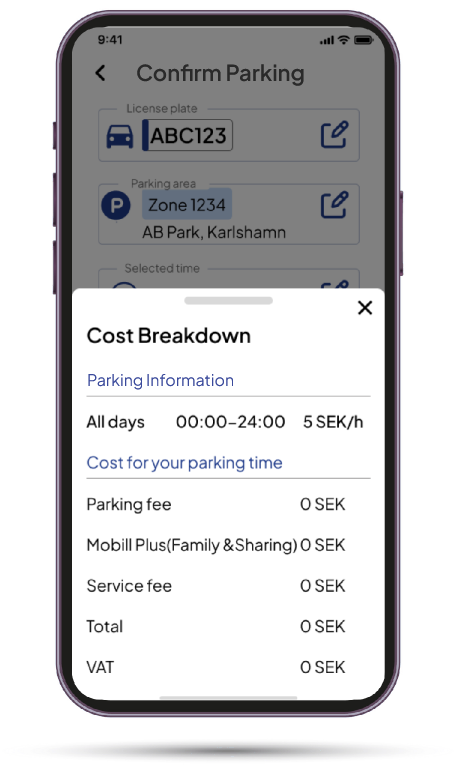
Showing the full cost before starting parking
- Problem & evidence
- Our review found that fees and totals weren’t clear before committing.
- My design decision
- Every fee is listed, including 0 kr. After mid-fi testing, the team made the whole price area tappable.
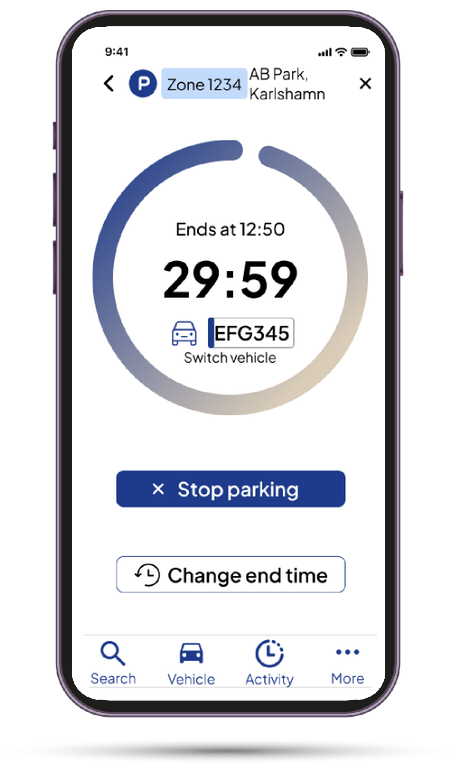
Making active parking easier to recognise
- Problem & evidence
- In lo-fi testing, active-parking status wasn’t visible enough, and the old confirmation could look “done” before parking was verified.
- My design decision
- A countdown ring, the end time and large actions to stop or change time make an active session easy to notice. The screen is meant to appear only after the system confirms the session — my prototype doesn’t test that back-end confirmation.
Reachability mode
- Moves key controls closer to the thumb — for anyone using one hand, not only left-handed users.
Larger touch targets
- Primary actions and icons enlarged to 44 px for easier, more accurate taps.
05Iteration
Success doesn’t always mean easy
In mid-fi testing with 13 participants, the cost breakdown had an 80% task-success rate, but participants still encountered friction.
Cost breakdown · mid-fi → hi-fi
- task success
- 80% → 100%
- misclick rate
- 70.6% → 60%
Two separate rounds: mid-fi (13 participants, Maze) and a small hi-fi test (2 participants). Not a statistically reliable comparison.
After the team made the price area tappable and changed the label to “View cost breakdown”, a small hi-fi test with two participants recorded 100% task success. However, the 60% misclick rate suggests the interaction still needs refinement.
06What I learned
What I learned
“Inclusive design is about understanding how real situations change people’s ability to interact.”
Small details — contrast, touch targets, clear labels — helped everyone. And a task can “succeed” while people still struggle. Next, I’d re-test with more users, in a real parking environment.